


XML Tutorial for iOS: How To Choose The Best XML Parser for Your iPhone Project
An XML tutorial for iOS to help you choose the best xml parser for your iPhone project, complete with benchmarking and a sample project. By Ray Wenderlich.
XMLPerformance Test App Extended To Compare 3rd Party Libraries

There are a lot of options when it comes to parsing XML on the iPhone. The iPhone SDK comes with two different libraries to choose from, and there are several popular third party libraries available such as TBXML, TouchXML, KissXML, TinyXML, and GDataXML. How is a developer to choose the best XML parser for their project?
I have been recently taking a look at the various options out there, and ended up extending the XMLPerformance sample from Apple to try out each of the above libraries to learn how they worked and compare their performance. I thought I’d share what I’ve learned thus far to others who might be searching for the best XML library for their iPhone project.
In this XML tutorial we’ll give a detailed comparison of the features and performance of the most popular iPhone libraries, explain how to choose between them, and give a sample project showing how to read XML data using each of the above libraries.
SAX vs. DOM
Before we begin, I wanted to make sure everyone is aware of the most important difference between XML parsers: whether the parser is a SAX or a DOM parser.
- A SAX parser is one where your code is notified as the parser walks through the XML tree, and you are responsible for keeping track of state and constructing any objects you might want to keep track of the data as the parser marches through.
- A A DOM parser reads the entire document and builds up an in-memory representation that you can query for different elements. Often, you can even construct XPath queries to pull out particular pieces.
Ok, now let’s discuss some of the libraries!
The Most Popular XML Parsers for the iPhone
In my research, here’s what seemed to me to be the most popular XML Parsers for the iPhone, and a brief description of each one:
- NSXMLParser is a SAX parser included by default with the iPhone SDK. It’s written in Objective-C and is quite straightforward to use, but perhaps not quite as easy as the DOM model.
- libxml2 is an Open Source library that is included by default with the iPhone SDK. It is a C-based API, so is a bit more work to use than NSXML. The library supports both DOM and SAX processing. The libxml2 SAX processor is especially cool, as it has a unique feature of being able to parse the data as it’s being read. For example, you could be reading a large XML document from the network and displaying data that you’re reading for it to the user while you’re still downloading.
- TBXML is a lightweight DOM XML parser designed to be as quick as possible while consuming few memory resources. It saves time by not performing validation, not supporting XPath, and by being read-only – i.e. you can read XML with it, but you can’t then modify the XML and write it back out again.
- TouchXML is an NSXML style DOM XML parser for the iPhone. Like TBXML, it is also read-only, but unlike TBXML it does support XPath.
- KissXML is another NSSXML style DOM XML parser for the iPhone, actually based on TouchXML. The main difference is KissXML also supports editing and writing XML as well as reading.
- TinyXML is a small C-based DOM XML parser that consists of just four C files and two headers. It supports both reading and writing XML documents, but it does not support XPath on its own. However, you can use a related library – TinyXPath – for that.
- GDataXML is yet another NSXML style DOM XML parser for the iPhone, developed by Google as part of their Objective-C client library. Consisting of just a M file and a header, it supports both reading and writing XML documents and XPath queries.
Ok, now let’s start comparing all these libraries!
XML Parser Performance Comparison App
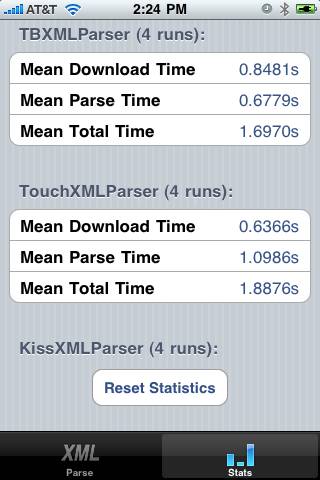
Apple has made an excellent code sample called XMLPerformance that allows you to compare the time it takes to parse a ~900KB XML document containing the top 300 iTunes songs with both the NSXML and libxml2 APIs.
The sample allows you to choose a parsing method and then parse the document, and it keeps statistics on how long it took to download the file and parse the file in a database. You can then go to a statistics screen to see the average download and parse times for each method.
I thought this would be an ideal way to test out how these various APIs performed against each other, so I extended the sample to include all of the above libraries. You can download the updated project below if you want to try it out on your device. It also serves as a nice example of how to use each of the above APIs!
Download Updated XMLPerformance Project
A note on the project: if the library included XPath support, I used it for a single lookup, because I felt it represented the way the library would be used in practice. But of course XPath is generally slower than manually walking through the tree, so it adds to the benchmarks for those libraries.
So anyway – I’ll discuss the results of how things performed on my device here with the sample written as-is – but feel free to give it a shot on your device, or tweak the code based on the actual XML data you need to parse!
XML Parser Performance Comparison
Here’s some graphs that shows how quickly the various parsers parsed the XML document on my device (an iPhone 3Gs):

As you can see here, NSXMLParser was the slowest method by far. TBXML was the fastest, which makes sense because many features were taken out in order to optimize parse time for reading only.
I was surprised, however, to see that TBXML and some of the other DOM parsing methods performed faster than libxml2’s SAX parser, which I had thought would be the fastest of all of the methods. I haven’t profiled it, but my guess as to why it is slower is because of the frequent string compares needed to parse the document in the SAX method.
However, don’t discount libxml2’s SAX method by looking at this chart. Remember that libxml2 is the only one of these methods that can parse the document as it’s reading in – so it can let your app start displaying data right away rather than having to let the download finish first.
Ok, here’s a graph that shows the peak memory usage by parser (this was obtained through running the various methods through the Object Allocations tool):

Note that the DOM methods usually require more memory overhead than the SAX methods (with the exception of TBXML, which is indeed quite efficient). This is something to consider when you are dealing with especially large documents, given the memory constraints on an iPhone.
Also note that libxml2’s SAX method is the best option as far as peak memory usage is concerned (and I suspect it would scale better than the others as well).
Finally, let’s wrap up with a chart that summarizes the differences between the parsers and everything we’ve discussed above:
* = with TinyXPath