

8 June 2010

Collisions and Collectables: How To Make a Tile Based Game with Cocos2D Part 2

Mmm, that was tasty!

Mmm, that was tasty!

This is the second part of a 2-part tutorial where we cover how to make a tile based game with Cocos2D and the Tiled map editor. We are creating a simple tile-based game where a ninja explores a desert in search of tasty watermelon-things!

In the first part of the tutorial, we covered how to create a map with Tiled, how to add the map to the game, how to scroll the map to follow the player, and how to use object layers.

In the this part of the tutorial, we’ll cover how to make collidable areas in the map, how to use tile properties, how to make collectable items and modify the map dynamically, and how to make sure your ninja doesn’t overeat.

So let’s pick up where we left off last time and make our map a bit more game-like!

Tiled Maps and Collisions

You may have noticed that currently the ninja can move right through walls and obstacles with no problem at all. He is a ninja, but even ninjas aren’t that good!

So we need to figure out a way to mark some tiles as “collidable” so we can prevent the player from moving into those positions. There are many possible solutions to this (including using object layers), but I’m going to show you a new technique that I think is effective and also a good learning exercise – using a meta layer and layer properties.

Let’s dive right in! Load up Tiled again, click “Layer\Add Tile Layer…”, name the Layer “Meta”, and click OK. This is the layer we will be putting a few fake tiles in to indicate “special tiles”.

So now we need to add our special tiles. Click “Map\New Tileset…”, browse to meta_tiles.png in your Resources folder, and click Open. Set the Margin and Spacing to 1 and click OK.

You should see a new tab in your Tilesets area for meta_tiles. Open it up and you’ll see two tiles: red and green.

Tiled and Meta Tiles

There is nothing at all special about these tiles – I just made a simple image with two red and green tiles with partial transparency. However we’re going to decide that red means “collidable” (we’ll use green later on), and paint our scene appropriately.

So make sure the Meta layer is selected, choose the stamp tool, choose the red tile, and paint over any object that you want the ninja to collide with. When you’re done it might look like the following:
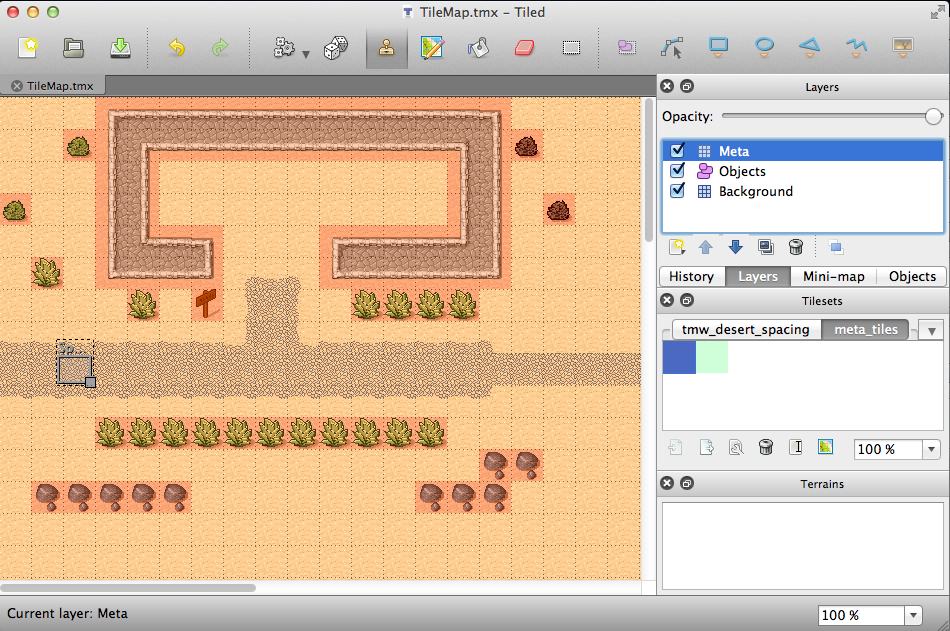
Tiled and Painting Tiles for Collision Detection

Next, we need to set a property on the tile to flag it so we can recognize in code that this is the tile that is “collidable.” Right click on the red tile in the Tilesets section, and click “Properties…”. Add a new property for “Collidable” set to “True” like the following:

Tile Properties in Tiled

Save the map and return to XCode. Make the following changes to HelloWorldScene.h:

// Inside the HelloWorld class declaration
CCTMXLayer *_meta;
 
// After the class declaration
@property (nonatomic, retain) CCTMXLayer *meta;

Then make the following changes to HelloWorldScene.m:

// Right after the implementation section
@synthesize meta = _meta;
 
// In dealloc
self.meta = nil;
 
// In init, right after loading background
self.meta = [_tileMap layerNamed:@"Meta"];
_meta.visible = NO;
 
// Add new method
- (CGPoint)tileCoordForPosition:(CGPoint)position {
    int x = position.x / _tileMap.tileSize.width;
    int y = ((_tileMap.mapSize.height * _tileMap.tileSize.height) - position.y) / _tileMap.tileSize.height;
    return ccp(x, y);
}

Ok let’s stop here a second. We declare a member/variable for the meta layer as usual, and load a reference from the tile map. Note that we mark the layer as invisible since we don’t want to see these objects, they are for annotating what is collidable only.

Next we add a new helper method that helps us convert x,y coordinates to “tile coordinates”. Each of the tiles has a coordinate, starting with (0,0) for the upper left and (49,49) for the bottom right (in our case).
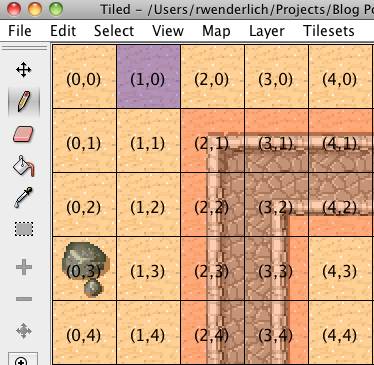
Tile Coordinates in Tiled

The above screenshot is from the Java version of Tiled, btw. Showing the coordinates for tiles is a feature I don’t think they’ve ported to the Qt version yet.

Anyway, some of the functions we’re about to use require tile coordinates rather than x,y coordintes, so we need a way to convert the x,y coordinates into tile coordinates. This is exactly what this function does!

Getting the x coordinate is easy – we just divide it by the width of a tile. To get the y coordinate, we have to flip things around because in Cocos2D (0,0) is at the bottom left, not the top left.

Next replace the contents of setPlayerPosition with the following:

CGPoint tileCoord = [self tileCoordForPosition:position];
int tileGid = [_meta tileGIDAt:tileCoord];
if (tileGid) {
    NSDictionary *properties = [_tileMap propertiesForGID:tileGid];
    if (properties) {
        NSString *collision = [properties valueForKey:@"Collidable"];
        if (collision && [collision compare:@"True"] == NSOrderedSame) {
            return;
        }
    }
}
_player.position = position;

Here we convert the x,y coordinates for the player to tile coordinates. Then we use the tileGIDAt function in the meta layer to get the GID at the specified tile coordinate.

Huh, what’s a GID? GID stands for “globally unique identifier” (I think). But in this case I like to think of it as the id for the tile we’re using, which would be the red square if that’s where we’re trying to move.

We then use the GID to look up properties for that tile. It returns a dictionary of properties, so we look through to see if “Collidable” is set to true, and if it is we return immediately, hence not setting the player position and making the move invalid.

And that’s it! Compile and run the project, and you should now no longer be able to walk through any tiles you painted red:

Screenshot demonstrating you cannot move through walls

Modifying the Tiled Map Dynamically

So far our ninja is having a fine time exploring, but this world is a little dull. There’s simply nothing to do!

Plus our ninja looks a bit hungry. So let’s spice things up by giving our ninja something to eat.

For this to work, we’re going to have to create a foreground layer for any objects we want the user to collect. That way, we can simply delete the tile from the foreground layer when the ninja picks it up, and the background will show through.

So open up Tiled, go to “Layer\Add Tile Layer…”, name the layer “Foreground”, and click OK. Make sure the Foreground layer is selected, and add a couple collectibles to your map. I liked to use the tile that looks like a Watermelon or something to me.

Adding collectibles to the Tile Map

Now, we need to mark those tiles as collectible, similarly to how we marked some of the tiles as collidable. Select the meta layer, switch over to the meta_tiles, and paint a green tile over each of your collectables. You’ll have to click “Layer\Move Layer Up” to make sure the meta layer is on top so that the green is visible.
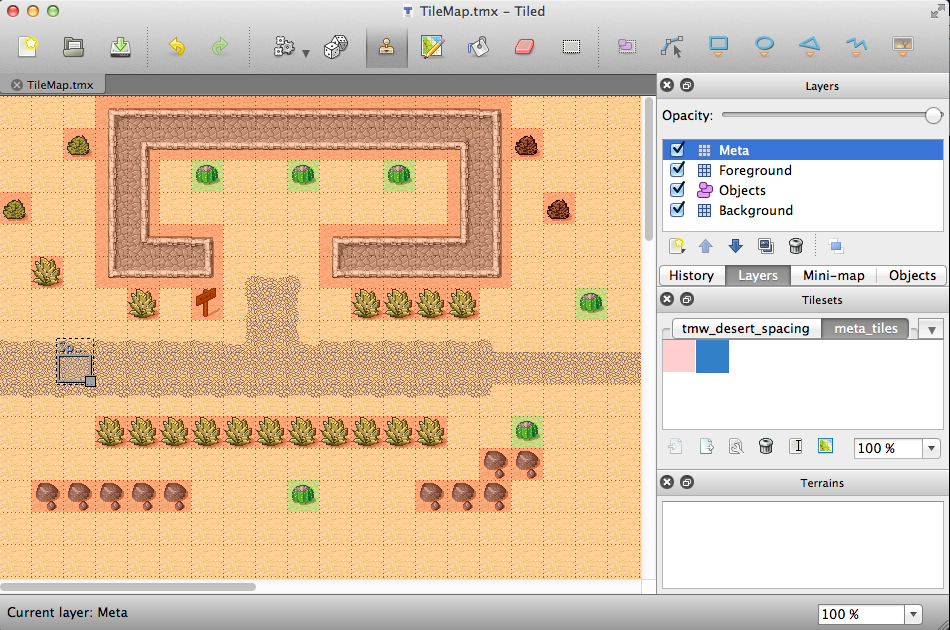
Painting collectables with meta tiles

Next, we need to add the property to the tile to mark it as collectable. Right click on the green tile in the Tilesets section, click “Properties…” and add a new property with name “Collectable”, value “True”.

Save the map and go back to XCode. Make the following changes to HelloWorldScene.h:

// Inside the HelloWorld class declaration
CCTMXLayer *_foreground;
 
// After the class declaration
@property (nonatomic, retain) CCTMXLayer *foreground;

Then make the following changes to HelloWorldScene.m:

// Right after the implementation section
@synthesize foreground = _foreground;
 
// In dealloc
self.foreground = nil;
 
// In init, right after loading background
self.foreground = [_tileMap layerNamed:@"Foreground"];
 
// Add to setPlayerPosition, right after the if clause with the return in it
NSString *collectable = [properties valueForKey:@"Collectable"];
if (collectable && [collectable compare:@"True"] == NSOrderedSame) {
    [_meta removeTileAt:tileCoord];
    [_foreground removeTileAt:tileCoord];
}

Here is standard stuff to keep a reference to the foreground layer. The new thing is we check to see if the tile the player is moving to has the “Collectable” property. If it does, we use the removeTileAt method to remove the tile from both the meta layer and the foreground layer.

Compile and run the project, and now your ninja will be able to dine on tasty-melon-thingie!

Screenshot of Ninja about to eat a melon

Creating a Score Counter

Our ninja is happy and fed, but as players we’d like to know how many melons he’s eaten. You know, we don’t want him getting fat on us.

Usually we’d just add a label to our layer and be done with it. But wait a minute – we’re moving the entire layer all the time, that will screw us up, oh noes!

This is a good opportunity to show how to use multiple layers in a scene – this is the type of situation they are built for. We’ll keep our HelloWorld layer as we’ve been doing, but we’ll make an additional Layer called HelloWorldHud to display our label. (Hud means heads up display).

Of course, our two layers need some method of communicating – the Hud layer will want to know when the ninja snacks on a melon. There are many many ways of getting the two layers to communicate, but we’ll go with the most simple way possible – we’ll hand the HelloWorld layer a pointer to the HelloWorldHud layer, and it can call a method to notify it when the ninja snacks.

So add the following to HelloWorldScene.h:

// Before HelloWorld class declaration
@interface HelloWorldHud : CCLayer
{   
    CCLabel *label;
}
 
- (void)numCollectedChanged:(int)numCollected;
@end
 
// Inside HelloWorld class declaration
int _numCollected;
HelloWorldHud *_hud;
 
// After the class declaration
@property (nonatomic, assign) int numCollected;
@property (nonatomic, retain) HelloWorldHud *hud;

And make the following changes to HelloWorldScene.m:

// At top of file
@implementation HelloWorldHud
 
-(id) init
{
    if ((self = [super init])) {
        CGSize winSize = [[CCDirector sharedDirector] winSize];
        label = [CCLabel labelWithString:@"0" dimensions:CGSizeMake(50, 20)
            alignment:UITextAlignmentRight fontName:@"Verdana-Bold" 
            fontSize:18.0];
        label.color = ccc3(0,0,0);
        int margin = 10;
        label.position = ccp(winSize.width - (label.contentSize.width/2) 
            - margin, label.contentSize.height/2 + margin);
        [self addChild:label];
    }
    return self;
}
 
- (void)numCollectedChanged:(int)numCollected {
    [label setString:[NSString stringWithFormat:@"%d", numCollected]];
}
 
@end
 
// Right after the HelloWorld implementation section
@synthesize numCollected = _numCollected;
@synthesize hud = _hud;
 
// In dealloc
self.hud = nil;
 
// Add to the +(id) scene method, right before the return
HelloWorldHud *hud = [HelloWorldHud node];    
[scene addChild: hud];
 
layer.hud = hud;
 
// Add inside setPlayerPosition, in the case where a tile is collectable
self.numCollected++;
[_hud numCollectedChanged:_numCollected];

Nothing too fancy here. Our second layer derives from CCLayer and just adds a simple label to the bottom right corner. We modify the scene to add the second layer to the scene as well, and pass the HelloWorld layer a reference to the Hud. Then we modify the HelloWorldLayer to call a method on the Hud when the count changes, so it can update the label accordingly.

Compile and run the project, and if all goes well you should see a melon counter in the bottom right!

Screenshot of melon counter

Gratuituous Sound Effects and Music

You know this wouldn’t be a game tutorial from this site without completely unnecessary but fun sound effects and music :]

Simply make the following changes to HelloWorldScene.h:

// At top of file
#import "SimpleAudioEngine.h"
 
// At top of init for HelloWorld layer
[[SimpleAudioEngine sharedEngine] preloadEffect:@"pickup.caf"];
[[SimpleAudioEngine sharedEngine] preloadEffect:@"hit.caf"];
[[SimpleAudioEngine sharedEngine] preloadEffect:@"move.caf"];
[[SimpleAudioEngine sharedEngine] playBackgroundMusic:@"TileMap.caf"];
 
// In case for collidable tile
[[SimpleAudioEngine sharedEngine] playEffect:@"hit.caf"];
 
// In case of collectable tile
[[SimpleAudioEngine sharedEngine] playEffect:@"pickup.caf"];
 
// Right before setting player position
[[SimpleAudioEngine sharedEngine] playEffect:@"move.caf"];

Now our ninja can groove happy as he eats!

Where To Go From Here?

That’s it for this tutorial series, at least for now. You should have a good grasp on the most important concepts related to using tile maps in Cocos2D at this point.

Here is a copy of the Tile-Based Cocos2D game that we’ve developed so far.

If you enjoyed this series, our good friends from Geek and Dad have developed a follow-up to the series: Enemies and Combat: How To Make a Tile-Based Game with Cocos2D Part 3! Check it out to see how you can extend the game to add enemies, projectiles, and a win/lose scene!

If you have any additional tips or suggestions for how to effectively use Tiled or tile-based maps in Cocos2D effectively, or if you’ve used or are planning to use tile-based maps in your projects, please share below!

Category: iPhone

Tags: , , , ,

154 Comments

  1. TGate (1 comments) says:

    Very Nice!!! Thanks for putting this tutorial together!

  2. kristof verbeeck (16 comments) says:

    cool
    thanks for the great tutorial
    now it will be easier to understand how to do my own stuff

  3. araker (1 comments) says:

    Nice tutorial, besides making a ‘meta’ layer it is also possible to give tiles in a tile set properties. Objects with fixed properties, like in this tutorial, wouldn’t need a meta layer then. You loose some flexibility that way, but save some time.

  4. Dad (41 comments) says:

    Geek ran into an issue today that i thought i’d pass on: he’s using the java version of tiled and is expanding on the app from this tutorial. He had set an image for objects in the object layer so he could tell at a glance which objects were which type (he has two types of objects in the object layer). Cocos2d-iPhone must do something with these because all the tiles on the foreground layer got their images replaced with the last image in the last object in the object layer. Once we removed the images from the objects in the object layer the problems went away.

    Hope that helps someone out there…

  5. Ray Wenderlich (492 comments) says:

    @araker: Yeah, we used tile properties in the tutorial as well for indicating whether a tile was a “collectable” or not. I used the meta tiles to indicate another strategy that you can use, depending really on your game and what’s easier for you. I like meta tiles in this case for collisions because it makes it really easy to “paint” what’s collidable even when they might not always line up to specific tiles.

    @Dad: Good to know, thanks for passing it on!

  6. lee (3 comments) says:

    Thanks a lot for the tutorial, I have learnt a lot.

    Question: Is it possible to save the changes made to the tilemap on the tmx file itself ?

    Eg: Once the ninja collect the melon, the wall tiles is to be removed and replaced with some other new walls. If the user exit and load back this game, he will still see the new walls.

  7. cqq (1 comments) says:

    thanks,very useful!

  8. Ray Wenderlich (492 comments) says:

    @lee: AFAIK there is no way to save the tile maps back to a TMX file from Cocos2D.

    However, what you can do is save out the GID at each position in each layer to an array yourself, and then just restore that on startup!

  9. sd (3 comments) says:

    These are the best tutorials I’ve found. I was trying to implement Tiled maps and couldn’t do it, but this is exactly what I was looking for.

    Now I can’t figure out …where to change the dimensions in Cocos2D to make it for iPad ? It’s just a little iPhone size inside the iPad.

  10. Ray Wenderlich (492 comments) says:

    @sd: Thanks to the awesomeness of Cocos2D, this is extremely easy. Simply do the following steps:

    1) Expand Targets, click TileGame, right click, choose Get Info.
    2) Change Targeted Device Family to iPhone/iPad.
    3) Recompile, run, and say “w00t!” :]

  11. sd (3 comments) says:

    Wow, I would not have found that on my own. Thank you. This is extremely helpful. Thanks for posting the working code. I’m planning on making a Tile-based game, only as a platformer (as opposed to top-down). If I just add gravity to the main character and build the world accordingly, it’s suddenly a Super-Mario-type game.

  12. Greg (5 comments) says:

    For people using version 0.99, the API for CCTMXTiledMap was not letting me use the propertiesForGID: method. I ended up going with:

    NSString *collision = [_tileMap propertyNamed:@"Collidable"];

    A straight call to the value through the TiledMap object.

  13. Mik (1 comments) says:

    i get and error message saying invalid inicializer in this line
    CGPoint tileCoord = [self tileCoordForPosition:position];

    could somebody please explain to me why is that? :)

  14. Dad (41 comments) says:

    @Mik possibly the tileCoordForPosition: method doesn’t return a CGPoint or the .h file for that method isn’t included so the compiler doesn’t know _what_ it returns.

    (not at computer to look anything up at the moment).

  15. Ray Wenderlich (492 comments) says:

    @Mik: TileCoordForPosition is a function we added in this tutorial, did you remember to add it to your project (and is it higher up in the file than where you are calling it in setPlayerPosition)?

  16. Syn (36 comments) says:

    I’m having the same problem, I’ve redone everything twice and double checked it all against your Source Code everything is lined up the same way and everything is coded correctly.

  17. Syn (36 comments) says:

    to the getting to the splash screen and it quits.

  18. Ray Wenderlich (492 comments) says:

    @Syn: I just pulled down the sample code and it seems to run OK for me, does it run OK for you?

    If the sample code runs but your project does not, I would check your tmx file and make sure that the images it references are included in your project (and in the right locations) and that you haven’t included more than one tileset per layer. If that doesn’t work, try replacing your tmx file with the one from the sample project.

    You can also narrow down what’s going on by setting a breakpoint in your HelloWorldLayer’s init method and seeing where it’s crashing.

  19. sd (3 comments) says:

    I don’t know if this helps but a problem I ran into is the simple mistake of moving files in an out of the resource folder using the finder instead of XCode.

  20. Syn (36 comments) says:

    It has something to do with the Meta Layer, I remove it, and it works fine, I add it, all I have are problems. I’m using cocos2d 0.99.2 with 10.5.7, So I tried using what Greg had posted, still the same error in the same spot.

    it wont get past

    self.tileMap = [CCTMXTiledMap tiledMapWithTMXFile:@"TileMap4.tmx"];

    and keeps showing me,

    rect.origin.x = (gid % max_x) * (tileSize_.width + spacing_) + margin_;

    in CCTMXXMLParser.m Even with all the meta layer codes commented out. my tiled version is the QT version but I checked the XML code across from mine to yours again everything matches. I’m at a loss,

  21. Syn (36 comments) says:

    Nevermind, I tried it with yours and it works, you made yours with the java version right? maybe it has to do with me using QT? I don’t know why I used that version but that’s what I got, I’m going to go download the Java version so I can see if it makes a difference or not as to which version you use and I’ll let you know.

    also as an added note, Would this same approach work with Isometric? or is there more coding involved?

    and the movement of the sprite is not very fluid on my screen he jumps to the position and its very rigid looking. Is it the same way for you or is it me?

  22. Dad (41 comments) says:

    @syn. Why using old version of cocos2d? Get 0.99.3

    This tutorial didn’t go into using Actions fit the animation of the move of the character. But it is quite easy to use the CCMoveTo Action to move the character.

    Something like:
    [self runAction: [CCMoveTo actionWithDuration: 0.25 position: viewPoint]];

    Look in the cocos2d documentation wiki under the basics – Actions.

  23. Syn (36 comments) says:

    @Dad I actually have downloaded 99.3, but when I try to load it, it says that it was made with a newer version of XCode, and might not work correctly, well I have the last version of xcode available for osx 10.5 so… if something wont work then how will I know if its a coding error or a problem with 99.3?

    I have the problem figured out, when I was making my maps through tiled that it was my fault, I wasn’t using the tiles and meta tiles from the resources folder in my project. it has to be both it can’t just be one, because I tried that yesterday with just the meta tiles and it still didn’t work. but all is good now.

    thanks I’m going to head over to the wiki right now to look that up.

  24. Syn (36 comments) says:

    ok i’ve been trying and trying to use that code but every time that I do it make the entire screen move off view but the sprite moves ok. I’m confused as to where that code needs to go in order to make this work ok. I’ve replaced the

    [self setPlayerPosition:playerPos]; with it same thing, add it to it, same thing, add it to the [self setViewPointCenter = _player.position]; same thing.

    I’m clearly not doing something right.

  25. Dad (41 comments) says:

    @Syn – sorry, partially my fault. That code snippet above is from the setViewpointCenter: method and it makes the map scrolling smooth. So in that method instead of:

    self.position = viewPoint;

    use the snippet I posted above:

    [self runAction: [CCMoveTo actionWithDuration: 0.25 position: viewPoint]];

    To animate the player move you edit the setPlayerPosition: method and replace:

    _player.position = position;

    with:

    [_player runAction: [CCMoveTo actionWithDuration: 0.25 position: position]];

    Sorry I wasn’t very clear in the first post. Hopefully this helps.

  26. Syn (36 comments) says:

    Thank you, that made things more clear as to where to put them. Unfortunately its still doing the same thing, :^( every time i click it runs the map off the screen.

  27. Dad (41 comments) says:

    Hmm. Ideas:
    – try turning off the map scroll animation and just animate the player move.
    – Make sure to notice that you are sending the “runAction:” message to the player object for the player move.
    – Make sure some old code from earlier tests isn’t still there somewhere.
    – show us the code so we can help you (maybe post it on http://paste.lisp.org/ and post the link here so we have syntax coloring and don’t have weird blog comment escape issues).

  28. Syn (36 comments) says:

    I tried all that confirmed all that and posted the paste, it is http://paste.lisp.org/+2E5D

  29. Dad (41 comments) says:

    @Syn ok. In ccTouchEnded you have the line:

    [self runAction: [CCMoveTo actionWithDuration: 0.25 position:_player.position]];
    //[self setPlayerPosition:playerPos];

    The first line is the one causing the problem. You are telling the layer to scroll to the player position!

    Since you have the player animation in the setPlayerPosition: method now, simply remove the [self runAction: line from ccTouchEnded and remove the comment // so that setPlayerPosition is called.

    That should fix it.

  30. Syn (36 comments) says:

    I did exactly what you said and it still does the same thing. I even tried,

    [CCMoveTo actionWithDuration: 0.25 position:_player.position];
    [self setPlayerPosition:playerPos];

    I tried removing one in each method still same problem. I tried taking out the one in the setViewPointCenter method samething. I’m sorry to be a pain I just want to figure this out.

  31. bbum (2 comments) says:

    Awesome set of tutorials. I just sat down with my 9 year old son and we made our first game (largely just the tutorial, only the ninja collects tennis shoes). Great way to spend Father’s Day!!

    I’ll be writing up detailed feedback on the tutorial shortly.

  32. Dad (41 comments) says:

    @Syn – The first line of the code you posted does nothing meaningful. Some sprite/CCNode must run the action or nothing happens. The problem you had in the code you posted to paste.lisp.org was that you were telling the Layer to run the animation but passing the Player position, that’s why it was zooming the map away. You need to tell tell the player to run the move animation with the player point. e.g., [_player runAction:[CCMoveTo actionWithDuration: 0.25 position: playerPos]];

    You had [self runAction: ...] where self is the layer, NOT the player. using [self runAction: ...] is correct for moving the layer to the new viewpoint which is the second one in your 1st paste.lisp.org code for ccTouchEnded.

    Start with the code you posted to paste.lisp. Comment out all the animation action code and just put in the position setting next to them – does it work? (are the layer and player moved to where they should be, albeit not animated?)

    If so, ok good, then your calculations of the points are correct. If not, fix the calculations first.

    Then add the animations back in, but NOT the first one in ccTouches just before the setPlayerPosition: call, leave that one out it is an error and unneeded since the setPlayerPosition: method does the player move animation.

    If that doesn’t work, post the code to paste.lisp.org and I’ll look at it again.

  33. Dad (41 comments) says:

    @syn – I edited the original paste.lisp.org post with an annotation:

    http://paste.lisp.org/display/111649

  34. Syn (36 comments) says:

    Ok I actually changed that originally but I had other lines of code messing it up, so It was my fault. got it now, Thank you so much for helping me this make all the difference in the world to me even if this game will never see public eyes plus now I know how to use it.

    now the back ground scrolling issue there isn’t alot of cushion with it, it seams if you are about 3-4 tile away from the left or right or 2-3 tiles away from the top and bottom it seams to jump. Now I know this is basically what I’ve been fighting all along but can I use the same effect on the layer to make it scroll easy as well or am i asking way to much from this function lol.

  35. Dad (41 comments) says:

    @Syn – I’m not too clear on the you don’t like about the background scrolling. He changes the viewpoint every time the player moves, unless doing so would scroll off the map visually. So what happens depends on your map size and where your player is on the map.

    Anyway, play around with it and understand what the code is doing and then see if you can get it to do what you want. Learn by looking into the cocos2d-iphone source and using breakpoints in the debugger to trace through the operation of the program to see what happens.

  36. Ray Wenderlich (492 comments) says:

    @Dad/Syn: Wow great discussion here, Dad thanks so much for helping Syn out!

    @bbum: Awesome, that does sound like a great Father’s day! I hope to enjoy that one day myself when I have a kid (fingers crossed that he/she likes programming!) :]

  37. DFectuoso (2 comments) says:

    Super awesome tutorial! This is amazing and great!

    Thank you very much!

    One question: I am building this on an iPad and I get some random black lines, did i mess something with the titles (if i move, the lines stay one the same place, so it is not the map, it seems like the library has a glitch). Does anyone see the same behavior?

    Here is an screenshot of what i get: http://i.imgur.com/LwKYy.png

  38. DFectuoso (2 comments) says:

    BTW if I add:

    for( CCTMXLayer* child in [self.tileMap children] ) {
    [[child texture] setAntiAliasTexParameters];
    }

    Then i get the next behavior: http://i.imgur.com/Hryap.jpg

  39. Syn (36 comments) says:

    @Ray I’m wanting to make the collectible reappear after a set amount of time. I’ve tried to think this through on my own and I’ve looked for documentation, but I can’t find a clear answer. I’ve tried setting an NStimer method called replaceCollectible, after the timer plays through it replaces the tile at tilecoord, then after the tile has been removed I access it via [self replaceCollectible:timer]; but nothing happens. Am I trying to over complicate something simple?

  40. Ray Wenderlich (492 comments) says:

    @DeFectuoso: There’s a ton of discussion on this issue on the Cocos2D forums – I’d check out this post as a good starting point: http://www.cocos2d-iphone.org/forum/topic/212#post-1171

    @Syn: Usually it isn’t recommended to use timers in Cocos2D, see the best practices guide here:

    http://www.cocos2d-iphone.org/wiki/doku.php/prog_guide:best_practices

    But anyway, say you make a function to replace a collectible after a set period. It should just call setTileAt to set the tile at specific locations to a collectible tile. No reason it shouldn’t work, so if it’s not I’d start setting some breakpoints in the debugger to see why not! :]

  41. Syn (36 comments) says:

    ok so I would use
    [self schedule:@selector(replaceCollectable:) interval:0.5];

    and then

    -(void)replaceCollectable:(ccTime)dt {
    [_foreground setTileAt:tileCoordForPosition];
    }

    right?

  42. Ray Wenderlich (492 comments) says:

    @Syn: Actually the method you want to use is setTileGID:at, but yeah that’s the general idea.

  43. Syn (36 comments) says:

    ok so I used [_foreground setTileGid:31 at:tileCoordForPosition]; I can’t access it do i have to declare the points over again in this function or am I doing something wrong? well i know I’m doing something wrong its a matter of what all I’m doing wrong.

  44. Dad (41 comments) says:

    @syn – If the compiler tells you unknown method, either you spelled it wrong (or case) or you have the wrong method name.

    Look at the class of _foreground. It’s a CCTMXLayer. Then look at CCTMXLayer.h. What methods does it implement that might do what you want?

    I see:

    -(void) setTileGID:(unsigned int)gid at:(CGPoint)tileCoordinate;

    which sounds like what you might be looking for.

  45. Syn (36 comments) says:

    http://paste.lisp.org/+2E5D/3

    Its a perfect match. I’m using setTileGID: at: as a function not as a method, now do i need to change my original schedule from replaceCollectable to setTileGID and make it a method?

  46. Dad (41 comments) says:

    @syn – sorry, my window was only showing your first comment/method signature and I didn’t see that Ray had already caught the error there.

    Thanks for posting source.

    I’m looking at this:

    -(void)replaceCollectable:(ccTime)dt {

    [_foreground setTileGID:31 at:tileCoordForPosition];
    }

    and wondering where the tileCoordForPosition is defined as a variable and where you set it such that it’ll be valid when this method is called.

    I see a method named “tileCoordForPosition” but I don’t see a variable called “tileCoordForPosition” and I don’t see where you are setting such a variable (class or instance variable) such that the replaceCollectable method will have the coordinate when it is called by the schedule: method….

    In fact, I don’t see how it should even compile as is… which makes me suspect that you _do_ have an instance or global variable named “tileCoordForPosition”… which means that the issue is that you aren’t setting it before calling the [self schedule: ...] call. (compiler warnings are your friend and I like to have a zero warning build so the important ones don’t get lost in a heap of “ok” ones )

    Clearly doing it this way has issues because the instance variable might be changed before the schedule call is actually made and you could end up with 2 at the same location… (threading is fun!)… but that’s a different issue.

  47. Dad (41 comments) says:

    @syn – oh, just to try and clarify for you, the statement “I’m using setTileGID: at: as a function not as a method” is not correct. It’s a method being called on the _foreground object; or, if you prefer, a message (“schedule:”) that is being sent to the _foreground object.

    The “schedule:” call schedules a method call to be made later on the object to which you send the “schedule:” message. So:

    [self schedule: @selector(replaceCollectable:) interval: 0.5];

    is sending the message “schedule:” to “self”, or if you like, calling the method “schedule:” of the object self.

  48. Syn (36 comments) says:

    well with this way I’m doing it, its not compiling. I even tried just tileCoord from the collectable function. I tried re-declaring the tileCoord in the replaceCollectable method, I’m not seeing how I can use this dynamically for all collectables. Because if I have to put in a position for every one I would have to make a new method every time. and I don’t see how I can get the collectable position. there is information I’m missing somewhere. I understand setTileGid: at: I understand that. what I don’t understand is how to dynamically set it so that it is for all the collectables.

  49. Syn (36 comments) says:

    Would this be any easier if i just used sprites?

  50. Dad (41 comments) says:

    @syn I don’t thing so.

    Not wishing to offend, but perhaps if you stepped back from the code and thought about the problem at a higher level it would help. What are you trying to do? What data do you need? Where can you get that data? When? How can you store that data so that it’s available later? If you don’t see an answer after considering those, drop a note and I’ll suggest something more concrete. There are multiple ways this can be done, as usual.

  51. Syn (36 comments) says:

    I have stepped away from it multiple times, worked on something else or just quit for a bit and took a break. I came up with a few ideas, but all flawed, that’s why I asked if it would just be easier to just use sprites, because then i could store my collectibles in an array and access them as I need them, but that still doesn’t answer the Coordinate problem. So I though well why don’t i just log the coordinate of the collectible into an array? then access it as I need it? I’ve looked for documentation on that and I guess I’m not using the right search phrases in google, the cocos2d wiki or the cocos2d forum because I can’t find anything.

  52. Dad (41 comments) says:

    @syn ok. Yes, saving the coordinates into an array is one of the approaches that seems to make sense. The easiest time to do that is when they pick the item up. Here’s one way to do this:

    1) Create a new NSMutableArray instance var for HelloWorld and allocate in the HelloWorld init method, and release it in the dealloc.

    2) in setPlayerPosition you can see the test for “is this a collectable” there. If it is a collectable, then you know you need to save it off into the array. Since NSArray only holds ObjC objects, use
    + (NSValue *)valueWithCGPoint:(CGPoint)point; to put them in, and the reverse to get them out. Note that you might as well store the tileCoord (not the “position” pixel coordinates) since that’s what you’ll need to set them back.

    3) schedule your “check for collectibles that need to be respawned” method and have it iterate through the array and respawn anything in there (using fast iteration). Have it then empty the array at the end once you’ve spawned them all.

    4) Your “respawn” will need to reverse what happened in the pick-up-collectable code, namely the opposite of:
    [_meta removeTileAt:tileCoord];
    [_foreground removeTileAt:tileCoord];

    notes:

    a) If you want different delays for each one, then you will need to store the time to spawn for each one also. Either create a custom class to hold the time + position (likely a class with only properties and synthesized set/get methods), or you could use a dictionary to hold both those values.

    b) it doesn’t appear that you need to worry about threading since cocos2d schedule: method isn’t using timers or anything else that might work on multiple threads (that I see on quick scan anyway). That means you don’t have to worry about your processing method being re-entered while you are process items. If the ccTouch events come in on another thread then this could cause you problems as they’d be trying to add items to the array while you were trying to process it. I don’t think they do, but I didn’t look into that.

    hopefully that makes sense.

  53. kristof verbeeck (16 comments) says:

    its weird
    when i build on the simulator, everything works

    but when i build it on an actual iPhone i get this from the console

    Program received signal: “SIGABRT”.

    i use an iPhone 3G with cocos2d 0.99.1
    the later versions all are for ARMV7 and i only have ARMV6 on my 3G

  54. Ray Wenderlich (492 comments) says:

    @kristof: I just downloaded the sample project and ran it on my device, and it worked OK for me. Have you tried the sample project? If you’re still having issues, try stepping through with the debugger to see exactly where the app is crashing.

  55. kristof verbeeck (16 comments) says:

    @ray: the problem is that i cant build the sample on my phone because when i set up armv6 as active architexture then it always goes back to armv7 and then when i build i get an error that theres no provisioned device connected
    but i copyed the code and then build it with your map, and now it works
    do you think it wight be because i used a menu to get to the gamescene ?

  56. kristof verbeeck (16 comments) says:

    @ray
    i keep getting the SIGABRT signal
    i even copy your code into my project and i included all you wrote in the app

    in the simulator i get the perfect result
    when i build it on device i get a SIGABRT signal

    i think it might be the fact that i use 0.99.1
    is there any way i can set 0.99.3 to ARMV6
    i cant get it to build on my device
    it always keeps returning to ARMV7
    anyone help ????????
    sorry for the annoyance….

  57. kristof verbeeck (16 comments) says:

    @ray
    i found the problem with my tilemap
    my image was not the correct format
    it was .png but i think it was not made correct
    i used a royalty-free tile for C programmers

  58. freeforce (2 comments) says:

    I added a Gem and a Rock, the Gem is collectable and the Rock is not.

    How do I add gravity on these items and also I would like to be able to push the rock upon player contact?

    What is the next step in this case?

  59. Ray Wenderlich (492 comments) says:

    @kristof: w00t glad you got it working!

    @freeforce: To implement pushing a rock, you’d want to check if the player is about to collide with a rock, and then you’d move the player to the spot the rock was in, and the rock one space over.

    Regarding gravity: are you trying to make a platformer? You could either fake your own gravity by doing some math or use Box2D to simulate the physics.

  60. Syn (36 comments) says:

    ok i’ve got as far as Step 2, I followed your tutorial Part 3 of this great set of tutes, and it actually helped me understand better what you are talking about that I need to do. My misunderstanding is coming from,
    use
    + (NSValue *)valueWithCGPoint:(CGPoint)point;

    how do I use a method to assign something into a Array?

  61. Dad (41 comments) says:

    @syn. I think you might be taking on a programming task at the intermediate level (making a game with a sophisticated game engine) without first learning the basics of the language and runtime and that is why you are finding it challenging. Doesn’t mean you can’t do it, but it might be helpful to take on some smaller more basic programs first. Getting a book on learning Cocoa/ObjectiveC programming (Mac or iPhone) and working through the samples therein might help speed your forward motion.

    The method listed is a class method ( the + tells you this ). So you send it to the class object, NSValue in this case:

    NSValue * foo = [NSValue valueWithCGPoint: ccp(10, 20)];

    This method creates a new NSValue object with the value of the CGPoint you pass into it.

    If you look at the documentation for NSMutuableArray, I suspect you can figure out how to add the newly created object to the array. If you don’t see it, drop another note here.

    You also really should read the documentation on Cocoa memory management if you haven’t yet. valueWithCGPoint: is returning you an ‘autoreleased’ object instance and you need to understand what that means in regards to memory management.

    peace.

  62. Dad (41 comments) says:

    @syn – Oh, just for the record, tutorial part 3 was created by my son, the “Geek” of Geek And Dad. He worked hard on it and deserves the credit! :-)

  63. Syn (36 comments) says:

    I have read a book on Objective C programming, I read, Beginning iPhone Development 3: Exploring the iPhone SDK. But it never went over, the usage of such code, I just picked up, Learn Objective C on the Mac, which was suggested reading for the book. Not to mention the book that have already read doesn’t exactly go over stuff like Cocos, or game development. and you can tell Geek he did a good job I enjoyed it.

    as to what you were saying, I would use it like so?

    NSValue *collectCoord = [NSValue valueWithCGPoint:tileCoord];

    then use

    [colletables addObject:collectCoord];

    collectables being my NSMutableArray

  64. Dad (41 comments) says:

    @syn – good collection of books, excellent.

    I’ll pass on your complements to Geek, thx.

    Your code looks lperfect. Because the NSValue is autoreleased, very unlikely to fail, and you don’t need it for anything else, it’s usual to skip the local var and put the creation directly into the addObject: parameter. Not sure the compiler isn’t just smart enough that it makes no difference though…

    Onward!

  65. Dad (41 comments) says:

    (that’s “perfect”; wish I could edit my comments to fix typos!)

  66. Syn (36 comments) says:

    ok now as far as the Fast Iteration, or Enumeration,
    for(CGPoint *collCoord in collectables){
    [_meta replaceObjectAtIndex:collCoord];
    [_foreground replaceObjectAtIndex:collCoord];
    }

    selector state does not have a valid object type, error.

  67. Dad (41 comments) says:

    @syn – you put NSValue* objects into the array, pretty good chance that’s what you’re going to get out of it :-)

  68. Syn (36 comments) says:

    right I forgot that I converted the CGPoint over to a NSValue. So do I need to convert it back to a CGPoint in order to use it? What about the Respawn code? I keep getting warnings on them, and they are terminating due to uncaught exceptions.

  69. Dad (41 comments) says:

    @syn Yes, you need to get the CGPoint out of the NSValue*

    replaceObjectAtIndex: isn’t even a method that CCTMXLayer even responds to that I can see…?

    Seems to me:

    -(void) setTileGID:(unsigned int)gid at:(CGPoint)pos

    is the inverse of removeTileAt:

  70. Syn (36 comments) says:

    I tried using that and it gives me an error that says,

    Incompatible Type for argument 2 of setTileGID:at:

  71. Dad (41 comments) says:

    @syn – the method signature tells you what kind of type it needs (CGPoint), so you are obviously not passing it that (!). Figure out what you are passing it and why it’s the wrong thing.

    Since you posted no code I just have to guess, but I’d say you are passing it the NSValue without converting it back to a CGPoint.

  72. Syn (36 comments) says:

    well i tried using

    CGPoint pt = [collectCoord CGPointValue]; to convert the value to CGPoint again but it can’t access collectCoord because its in the setPlayerPosition. I tried just accessing the Array, but I can’t do that because the array doesn’t respond to the value because it tries to load the CGPoint back into the array.

  73. Dad (41 comments) says:

    @syn – Programming is about figuring stuff out. You should take this to the cocos2d-iphone forums. Too much for comments on a tutorial. I’d also suggestion you read this post on how to ask for and get help on forums, it’s good:

    http://www.mikeash.com/getting_answers.html

    Last comment:

    Define kCOLLECTABLE_ID to be the gid of your collectable thingie, and use code something like the following (I haven’t tried to compile it, just typed in generally what should work – you’ll have to figure out any issues on your own as I’m too busy to spend more time on this).

    for (NSValue * coordValue in collectables) {
    [_meta setTileGID: kCOLLECTABLE_ID at: [coordValue CGPointValue]];
    [_foreground setTileGID: kCOLLECTABLE_ID at: [coordValue CGPointValue]];
    }

  74. Ray Wenderlich (492 comments) says:

    @Syn: Syn, I hate to say this but I think @Dad has helped you more than enough at this point, and probably has his own projects he needs to focus on at the moment!

    @Dad has tried to get you started in the right direction, but from here on out I think it’s best if you try figuring out things on your own. If get really stuck maybe back up and take an easier project, or direct further questions to the cocos2d forums or stack overflow:

    http://www.cocos2d-iphone.org/forum/

    http://stackoverflow.com/

    Sorry but you’ll learn more in the long run figuring it out yourself anyway! :]

    @Dad: Thanks again for all of your patient help!

  75. earlystar (10 comments) says:

    Hey hi ray. i have problem

    @implementation HelloWorldHud

    -(id) init
    {
    if ((self = [super init])) {
    ……….
    CCMenuItemImage *button = [CCMenuItemImage itemFromNormalImage:@"play.png"
    selectedImage:@"play1.png"
    target:self
    selector:@selector(callMenu:)];
    }
    return self;
    }

    - (void) callMenu:(id) sender {

    [[CCDirector sharedDirector] replaceScene[MenuScene scene]];
    }

    @end

    i added button. But @selecter doesn’t work.

  76. Marc-André Weibezahn (13 comments) says:

    Man, thanks a million for this great tutorial! I can’t measure how much time it saved me, must be several days for sure!
    Keep up the good work 8)

  77. Ray Wenderlich (492 comments) says:

    @earlystar: If you haven’t already, you may want to check out my tutorial on how to create buttons with Cocos2D:

    http://www.raywenderlich.com/414/how-to-create-buttons-in-cocos2d-simple-radio-and-toggle

    @Marc: Awesome glad it helped!

  78. Ian (3 comments) says:

    Hi Ray,

    Great tutorial, thanks for posting it.

    How would you improve the tile game to make it sleeker and less “tiley” i.e. smoother animations when moving; less discrete jerks. Is the trick to increase the number of tiles? Or to do some animation across tiles? Or to move the camera a bit slower with inertia effects maybe?

    Or is to keep the tile based layout at the same size, but change the ninja’s movement to make it smoother (i.e. make it be able to move a fractional tile)?

    The end objective is sleeker, more analog movement.

    Thank you!

    Cheers,
    Ian

  79. earlystar (10 comments) says:

    @implementation HelloWorldHud

    -(id) init
    {
    if ((self = [super init])) {
    CGSize winSize = [[CCDirector sharedDirector] winSize];

    CCMenuItemImage *button = [CCMenuItemImage itemFromNormalImage:@"play.png"
    selectedImage:@"play1.png"
    target:self
    selector:@selector(callMenu:)];

    label = [CCLabel labelWithString:@"0" dimensions:CGSizeMake(50, 20)
    alignment:UITextAlignmentRight fontName:@"Verdana-Bold"
    fontSize:18.0];
    label.color = ccc3(0,0,0);
    int margin = 10;
    label.position = ccp(winSize.width – (label.contentSize.width/2)
    – margin, label.contentSize.height/2 + margin);
    [self addChild:label];
    }
    return self;
    }

    - (void)numCollectedChanged:(int)numCollected {
    [label setString:[NSString stringWithFormat:@"%d", numCollected]];

    - (void) callMenu:(id) sender {

    [[CCDirector sharedDirector] replaceScene[MenuScene scene]];
    }

    }

    @end

  80. earlystar (10 comments) says:

    this method doesn’t work “- void callMenu:(id) sender {
    [[CCDirector sharedDirector] replaceScene[MenuScene scene]];
    }

  81. Syn (36 comments) says:

    Try this,

    CCMenuItemImage *button = [CCMenuItemImage itemFromNormalImage:@"play.png"
    selectedImage:@"play1.png"
    target:self
    selector:@selector(callMenu:)];

    CCMenu *menu = [CCMenu menuWithItems:button, nil];

    int margin2 = -145;
    menu.position = ccp(winSize.width – (menu.contentSize.width/2) – margin2, menu.contentSize.height/2 + margin2);
    [self addChild:menu];

    Your selector looks fine. and the replace scene works, I’m doing it the same way and it works for me.

  82. Ray Wenderlich (492 comments) says:

    @Ian: Yeah that’s definitely possible, just use actions like CCMoveTo for smooth animation between positions rather than setting the position like I did.

    @Syn: Thanks for helping out earlystar!

  83. Mike Croswell (2 comments) says:

    @Ray Thanks for the great tutorial!

    I’m still trying to figure out the Objects layer and why it uses pixel coords instead of tile coords? I mean, besides spawn point, what other things it might be useful for? Does it have other built-in attributes, besides x and y that folks tend to use? I guess not.

    Also, I’m going to add an even farther-back, background (like a flat skybox) to the map and see if it can handle alpha (transparency) in your current background level. Possible?

    Again, thanks for the education!

  84. bbum (2 comments) says:

    @Mike Think about a game like, say, Super Mario Brothers. It could easily be done using Cocos2d, but you need a layer that has pixel based coordinates to smoothly animate Mario & the Mushrooms (and other characters). Even a flat dungeon-esque game, there are many play modes that might require that.

    @Ray et. al.

    I have a PNG w/3×6 64×64 tiles. Typical. Now I really want to have 6×6 64×64 tiles, but I don’t want to redraw existing maps (and I really don’t want to add a new tileset as that is inconvenient). Is there any way to expand the # of tiles in a single tileset without screwing up existing map data?

  85. Dad (41 comments) says:

    @bbum – if you look at the inside of the tmx file it’s just xml. In the java tiled editor you can turn of compression and it’ll spit out the gids part in long form.

    99% sure the gids are sequential x then y. So the key is to keep the gids of the images in the existing tile png file the same and add the new images on the end. Then just replace the png file (give it the same name as referenced in the tmx file) and it should ‘just work’

    So, if I understand your notation, open your existing png file, change the canvas size to twice the width, bring row 2 of your existing tiles up to be the second (or right) half of row 1 to make the first row 6 wide, then bring row 3 up to be the first (lef) half of row two. Then add your other images as you like in the remaining spaces (2nd half of row two, rows 3-6) and save the png with the same name. Easy to test in tiled – it shows you the tiles in the tileset view and your map will be rendered properly if it was done right.

    hopefully that makes sense. if not, dm me.

  86. Dad (41 comments) says:

    @bbum – btw, cocos2d-iphone only supports one tileset per tmx map, even though the tmx file format supports multiple. At least according to the docs:

    http://www.cocos2d-iphone.org/wiki/doku.php/prog_guide:tiled_maps

    (ah, and the source – only one CCTMXTilesetInfo *tileset_; instance var in CCTMXLayer).

  87. Dad (41 comments) says:

    Sorry, that’s only one per _layer_, not per map.

  88. earlystar (10 comments) says:

    CCMenuItemImage *button = [CCMenuItemImage itemFromNormalImage:@"play.png"
    selectedImage:@"play1.png"
    target:self
    selector:@selector(callMenu:)];

    “target:self” IS THIS LINE RIGHT?
    Sorry for my bad english. if i already knew the english then ask too many question :)

  89. Marc-André Weibezahn (13 comments) says:

    @earlystar: yes it is probably correct, do you have any problems with it? Is your selector callMenu: also in this class?

  90. earlystar (10 comments) says:

    if “callMenu” method work it invoke [MenuScene scene] But it doesn’t work.
    HelloWorldHud is another class outside the HelloWorld class. I thought “target:self” is problem.

  91. Marc-André Weibezahn (13 comments) says:

    I am not sure if I understand your problem correctly. Could you post more information or upload your class to somewhere?

  92. Ray Wenderlich (492 comments) says:

    Wow you guys are awesome, I came on here to answer any outstanding questions but you guys had already done it! Thanks guys! :]

  93. Joey (4 comments) says:

    Hmm almost everything works. I got my own made tilesetmap in the game. My own sprite with a spritesheet thats moving very nice if you touch the map. Collision works, collectable items work sound works but for some reason I dont see my Score label anywhere. Tried putting it in the center to test but also nothing.

    My GameScene.h (HelloWorldScene.h)

    @interface GameSceneHud : CCLayer
    {
    CCLabel *label;
    }

    - (void)numCollectedChanged:(int)numCollected;

    @end

    with int _numCollected; and GameSceneHud *_hud; in @interface of GameScene also the right property’s.

    @implementation GameSceneHud

    -(id) init
    {
    if ((self = [super init])) {
    //CGSize winSize = [[CCDirector sharedDirector] winSize];
    label = [CCLabel labelWithString:@"0" dimensions:CGSizeMake(50, 20) alignment:UITextAlignmentRight fontName:@"Verdana-Bold" fontSize:18.0];
    label.color = ccc3(0,0,0);
    //int margin = 10;
    label.position = ccp(240 ,160);
    [self addChild:label];
    }
    return self;
    }

    - (void)numCollectedChanged:(int)numCollected {
    [label setString:[NSString stringWithFormat:@"%d", numCollected]];
    }

    @synthesize hud in GameScene implementation with : GameSceneHud *hud = [GameSceneHud node];
    [scene addChild: hud];
    layer.hud = hud;
    in + (id) scene

    In setPlayerPosition method :
    [_hud numCollectedChanged:_numCollected];

    self.hud = nil; in dealloc.

    Im clueless. :(

  94. Marc-André Weibezahn (13 comments) says:

    Hi Joey,

    I can see no error in your code, so all I can do is to propose some of the things that I do when I have similar problems:

    - Try to make the label with a string like “hello world” instead of a short number which could easily be overlooked if it is half out of the screen or so.
    - Choose a flashy color for the label.
    - Make the label 480*320 px big and center it in the screen
    - choose UITextAlignmentCenter to align the label
    - Choose a big font size
    - double check if you have added the label on top of all the other layers/sprites

    I know that this are all not really super clever genius things to do, but for me this has been useful more than once. I tend to overlook things ;)

    hth!
    Cheers,
    Marc-André

  95. earlystar (10 comments) says:

    You guess so smart. I added menu button in layer. But button’s selector doesn’t invoke another scene. Example [[CCDirector sharedDirector] replaceScene:[Menu scene]].
    Those codes no error but selector doesn’t work. What happened? I don’t know.

  96. earlystar (10 comments) says:

    In this example We need add button in the HelloHud class. My english is bad ^.^ What can i say?

  97. Marc-André Weibezahn (13 comments) says:

    Earlystar, did you make sure your selector is invoked? It should be, but test it with a “NSLog(@”hi you pressed me”); or something… Then you know that the mistake is in one of the following methods.

  98. Ray Wenderlich (492 comments) says:

    @Marc: Thanks so much for helping out again!!

    @Joey: @Marc had some great suggestions, and another thing to check is z-ordering. By default, Cocos2D presents objects in the order you add them to the scene, so if you add the Hud first and the Tilemap second (and accept the default z-order), the Tilemap will cover the Hud.

    An easy fix for this is to just use a call [self addChild:label z:100] or such to set the label to a higher z-order.

    Let me know if this helps or if you’re still stuck!

    @earlystar: I agree with @Marc, would be helpful to know if the button is being called or not to help diagnose this further.

  99. kristof verbeeck (16 comments) says:

    hi
    i try to make a button in the HelloWorldHud layer
    but it has to do something in the HelloWorld layer
    it has to walk
    i already figured out how to walk
    but if i make the buttons on my HelloWorld layer, then the buttons disappear when i walk

    and when i make the buttons i the HelloWorldHud layer
    then the buttons stay on screen
    but then i cant make the actions inside the HelloWorld layer

  100. kristof verbeeck (16 comments) says:

    i got the action to work on my HelloWorld layer
    but now i cant get it to work on that layer like it should be
    i get the NSLog to work but the player does not move at all

    here’s my code

    -(void)goUp:(id)sender
    {
    NSLog(@”pressed up”);
    CGPoint playerPos = _player.position;
    //playerPos.x += _tileMap.tileSize.width;

    CGPoint newpos = ccp(playerPos.x + 32.0, playerPos.y);
    CGPoint diff = ccpSub(playerPos, newpos);

    playerPos.x += _tileMap.tileSize.width;

    //id actionMove = [CCMoveTo actionWithDuration:1.5 position:ccp(playerPos.x + 32.0, playerPos.y)];
    //playerPos.x = CCMoveTo newpos;
    //playerPos.x = actionMove;

    //player.position = playerPos; // Todo: Trymove
    if (playerPos.x <= (_tileMap.mapSize.width * _tileMap.tileSize.width) &&
    playerPos.y = 0 &&
    playerPos.x >= 0 )
    {
    [self setPlayerPosition:playerPos];
    }

    [self setViewpointCenter:_player.position];

    }

    i dont know whats wrong with it
    i got 0 errors

  101. Marc-André Weibezahn (13 comments) says:

    @kristof, dont know if this is what causes your confusion, but your player does not move up, it moves to the right here:

    CGPoint newpos = ccp(playerPos.x + 32.0, playerPos.y);

    Instead you need to manipulate the positon.y coordinate.

  102. kristof verbeeck (16 comments) says:

    @Marc-André Weibezahn
    the player does not move in any direction
    i tried your way by changing the x to y
    and i pasted your code in and deleted mine

    but still nothing

  103. Marc-André Weibezahn (13 comments) says:

    oh, the mistake could lie here:

    if (playerPos.x = 0 )
    {
    [self setPlayerPosition:playerPos];
    }
    Try this instead:

    if (playerPos.x <= (_tileMap.mapSize.width * _tileMap.tileSize.width) && playerPos.y = 0 && playerPos.y >= 0)
    {
    [self setPlayerPosition:playerPos];
    }

    let me know if this works :)

  104. kristof verbeeck (16 comments) says:

    @Marc-André Weibezahn
    sorry, still nothing

    here’s a copy of the project
    you might see it better this way

    http://www.megaupload.com/?d=ZFCXQUEI

    if you open the console then you can see that the button is reacting to the touch

  105. Marc-André Weibezahn (13 comments) says:

    I found the mistake, there you are:

    http://weibezahn.com/app00098.zip

    Basically your mistake was that as the target of your menuItems you called [HelloWorld node] which would only create another HelloWorld instance but make no connection to the HelloWorld instance you are using in your game.

    What I changed:
    - Define a delegate in the HelloWorldHUD interface and make your HelloWorld instance the hud’s delegate in the +(id)scene method.
    - Add methods for movement to HelloWorld.
    - invoke this methods in the hud by calling [delegate goUp] etc.

    Hope you can go on with your game now :)

  106. kristof verbeeck (16 comments) says:

    @Marc-André Weibezahn

    ok
    now i get it
    i understand it totally
    thanks for the helping man, really

  107. earlystar (10 comments) says:

    it works. Thanks guys and Thanks Ray.

  108. Ray Wenderlich (492 comments) says:

    @kristof/@Marc: Came here to check up on things but Marc “the awesome one” has again beat me to it! Thanks Marc, and glad you got it working kristof!

  109. scott Woods (1 comments) says:

    Hi Ray, Just wanted to thank you for the great tutorials. you are a good guy. and have an easy to read writing style.

    Hopefully the next tutorial is about making NPCs. Not as easy as one would think!

  110. Robert (3 comments) says:

    Hi Ray,

    Many thanks for creating such a brilliant set of cocos2d tutorials, they really are first class!

    A quick question for you…

    How could I set up 2 (or more) adjacent tiles that would be programmatically removable, eg to represent a wide door or other barrier? Since the player will only trigger a collision with 1 of these door tiles how could I remove the adjacent tile/s (which could be either to the left or right of the tile that the player collided with)?

  111. Marc-André Weibezahn (13 comments) says:

    @Robert

    I would solve this via a “door” property and then check if a tile with such a property lies adjacent to the tile that triggered the collision.

    Cheers,
    Marc-André

  112. Ray Wenderlich (492 comments) says:

    @Scott: Thanks for the kind words! :]

    @Robert: Yep @Marc is correct, and since you know the tile coordinate for where the player is, you can just create a tile coordinate for the nearby tiles such as ccp(curLocation.x-1, curLocation.y) and check those as well.

  113. Imran (4 comments) says:

    you are using one image on tile set . but i have multiple images 100 to 200 . can i load all images on one tile set. if i can so plz guide me how ? thanks in advance

  114. Ray Wenderlich (492 comments) says:

    @Imran: You can put as many images as you’d like within a sprite sheet (even if the images are unrelated) as long as they can fit within the maximum sprite sheet size (which is either 1024×1024 or 2048×2048, I forget).

  115. Kim (4 comments) says:

    I got a problem here
    NSDictionary *properties = [tileMap propertiesForGID:tileGid];
    Warning: CCTMXTileMap may not repond to -propertiesForGID
    After 1 collision, the app crash. The console showed that *** Terminating app due to uncaught exception ‘NSInvalidArgumentException’, reason: ‘*** -[CCTMXTiledMap propertiesForGID:]: unrecognized selector sent to instance 0xe5ffc0′
    I can’t figure out what’s the error.

  116. Marc-André Weibezahn (13 comments) says:

    Quick fix: try upgrading to a more recent version of cocos2d. There was a minor upgrade release that for some reason did not contain this method. I encountered this problem myself.

    Cheers,
    Marc-André

  117. Kim (4 comments) says:

    @Marc-André Weibezahn: thank you.

  118. earlystar (10 comments) says:

    Hey Ray that’s amazing tutorial. You are great free tutorial maker in the world. How about next tutorial Apple’s gamekit and Bonjour for using cocos2d.
    ^^ Thank you

  119. stef (5 comments) says:

    This is so freaking cool

    Well done Ray

  120. Ray Wenderlich (492 comments) says:

    @Marc: Thanks again for helping out!! :]

    @earlystar: Thanks! That sounds like an interesting and fun idea, added to the idea list!

  121. Alex Tau (7 comments) says:

    Running into the same problem as Greg, I decided to download and install the latest Cocos2d. Now I get the ‘no provisioned device connected’ error. How to solve this? Thanks.

  122. kristof verbeeck (16 comments) says:

    @Alex Tau
    @Greg
    you have to update you current iPhone/iPod touch/iPad to the latest iOS
    the newest iOS for iPhone/iPod touch is 4.0.1 (or if you have the beta SDK then its 4.1 beta 3)
    the newest iOS for iPad is 3.2.1
    that will solve the problem

  123. Alex Tau (7 comments) says:

    Thanks. Though, I have an advice for people with same weird behavior as mine: plug your cable into the MAC! not into the turned off PC on to which the MAC is sitting.

  124. kristof verbeeck (16 comments) says:

    @Alex Tau

    that could do it to LOL

  125. mcshin (1 comments) says:

    Such a great articles!

  126. Alexander Schäfer (5 comments) says:

    Thank you for this article! Great tutorial!

    I implement SneakyInput to control player. Works great. But I think collision detection did not work proper. collision is detected at the half of the player sprite. So the player overlap one half of the sprite with collidable “true” meta. Any hints?

    Thanks for all!!

  127. forkon (8 comments) says:

    Thans Ray again. Handsome article, Handsome Ray!

  128. Imran (4 comments) says:

    Hi Ray,
    i implement the animation of characters by creating the there own class which have its own movement functions and distance calculating functions on tile map. when i crate one object its work fine and move along the all points when i create more than one object only one object move along all points and other object move to only one point . here is my code please tell me where is the problem in this code thanks in advance.

    //
    // Workers.m
    // Street_Vendor_Tycoon
    //
    // Created by Suave Solutions on 10/08/10.
    // Copyright 2010 __MyCompanyName__. All rights reserved.
    //

    #import “Workers.h”
    #import “Street_Vendor.h”
    #import “xyPoints.h”
    @implementation Workers
    @synthesize Worker_type,Worker_Direction,Worker_Destination;
    @synthesize Worker_xPosition,Worker_yPosition;
    @synthesize Worker_Cash_Amount;
    @synthesize points_toWalk, IsSecond,count_object, tempWorker,points_toWalk1;
    @synthesize iam_walking;
    xyPoints *point1;
    xyPoints *point2;
    xyPoints *point3;
    xyPoints *point4;
    xyPoints *point5;
    xyPoints *point6;
    xyPoints *point7;
    CGPoint cg_point;
    CGPoint mov_point;
    CCLabel *lblTest;
    int array_index;
    id workAnimi;
    id aniaction;
    BOOL ck_ct=0;

    int ii=0;
    int m=0;
    int k=0;
    id walkAnim ;
    xyPoints *xy;
    xyPoints *xy1;
    //TileMap:(CCTMXTiledMap *)TileMap
    -(id)initWithPos:(CGPoint)point TileClass:(Street_Vendor *) TileClass
    {

    if( (self=[super init] )) {

    //printf(“\n\n\n hellow \n\n\n”);
    iam_walking=TRUE;

    ccColor3B col;
    col.r=0;
    col.g=0;
    col.b=0;

    ccColor3B col1;
    col1.r=255;
    col1.g=255;
    col1.b=0;
    ccColor3B col2;
    col2.r=0;
    col2.g=255;
    col2.b=255;
    ccColor3B col3;
    col3.r=255;
    col3.g=0;
    col3.b=255;
    ccColor3B col4;
    col4.r=114;
    col4.g=144;
    col4.b=144;

    ccColor3B col5;
    col5.r=85;
    col5.g=85;
    col5.b=85;

    points_toWalk=[[NSMutableArray alloc]init];
    points_toWalk1=[[NSMutableArray alloc]init];
    Worker_type=@”";
    Worker_xPosition=869;
    Worker_yPosition=544;
    Worker_Direction=@”down”;
    Worker_Destination=@”Home”;
    Worker_Cash_Amount=500;

    // [self schedule:@selector(dif:) interval:1];
    //NSThread * t2 = [[NSThread alloc] initWithTarget:self selector:@selector(Chk_Distance) object:nil ];
    //NSThread * t1 = [[NSThread alloc] initWithTarget:self selector:@selector(StartMoving:) object:nil ];
    [[CCSpriteFrameCache sharedSpriteFrameCache] addSpriteFramesWithFile:@”worker01.plist”];

    // Create a sprite sheet with the Happy Bear images
    CCSpriteSheet *spriteSheet = [CCSpriteSheet spriteSheetWithFile:@"worker01.png"];
    [TileClass._tileMap addChild:spriteSheet];
    // Load up the frames of our animation
    NSMutableArray *walkAnimFrames = [NSMutableArray array];
    for(int ws = 1; ws<= 8; ++ws) {
    [walkAnimFrames addObject:[[CCSpriteFrameCache sharedSpriteFrameCache] spriteFrameByName:[NSString stringWithFormat:@"frame0%d.png", ws]]];
    }
    walkAnim =[ [CCAnimation animationWithName:@"walk" delay:0.1f frames:walkAnimFrames]retain];

    tempWorker = [CCSprite spriteWithFile:@"work02_frame01.png"];

    tempWorker.position=point;
    aniaction=[[CCAnimate actionWithAnimation:walkAnim restoreOriginalFrame:YES]retain];
    [cache createSpriteWithFrameName:@"blob_idle_01.png"];
    workAnimi=[[CCRepeatForever alloc]init];
    [[workAnimi initWithAction:aniaction]retain];
    // id action = [CCRepeatForever actionWithAction:[CCAnimate actionWithAnimation:walkAnim]];
    [tempWorker runAction:workAnimi ];

    lblTest = [CCLabel labelWithString:@"" fontName:@"Marker Felt" fontSize:10];
    lblTest.position = ccp(0 ,0);
    [TileClass._tileMap addChild: lblTest z:3];

    //printf("\n\n\n\random number %d ",rand);

    [TileClass._tileMap addChild:tempWorker z:2];
    // [self StartMoving:cg_point ];
    //[self Chk_Distance];

    }
    return self;
    }

    -(void) StartScedules
    {
    xyPoints *ptrd = [[xyPoints alloc] init];
    ptrd = (xyPoints *) [points_toWalk objectAtIndex:array_index];
    cg_point.x = ptrd.X;
    cg_point.y = ptrd.Y;
    [self StartMoving:cg_point ];

    //[self Chk_Distance:cg_point];

    [NSTimer scheduledTimerWithTimeInterval:0.1 target:self selector:@selector(Chk_Distance:) userInfo:nil repeats:YES];

    // [NSTimer scheduledTimerWithTimeInterval:0.1 target:self selector:@selector(StartMoving:) userInfo:nil repeats:YES];

    }

    -(void)Rotate_to:(float)angles
    {

    id actionRotate=[CCRotateTo actionWithDuration:0.5 angle:angles];
    [tempWorker runAction:[CCSequence actions:actionRotate, nil]];

    }
    -(void) StartMoving:(CGPoint) pointer
    {
    float dist_time=ccpDistance(pointer, tempWorker.position);
    dist_time=dist_time/60;
    printf("time %f\n",dist_time);
    id actionmove = [CCMoveTo actionWithDuration:dist_time position:pointer];
    [tempWorker runAction:[CCSequence actions:actionmove, nil]];
    }

    -(void)Chk_Distance:(CGPoint) pointer
    {

    [lblTest setString:[NSString stringWithFormat:@"%d", array_index]];
    CGPoint tempPt;
    tempPt.x = tempWorker.position.x;
    tempPt.y = tempWorker.position.y;
    tempPt.y +=10;
    lblTest.position = tempPt;

    // int DecisionValue = (arc4random() % 2)+0;
    // printf("decision value %d",DecisionValue);
    // if(DecisionValue==0)
    // return;
    //
    int dis=ccpDistance(cg_point, tempWorker.position);
    // printf("dist %d\n", dis);
    if(iam_walking==TRUE)
    {
    if(dis < 1)
    {
    array_index++;
    if(array_index==[points_toWalk count])
    array_index=0;

    //printf("i am winer of 5");
    xyPoints *tempxy1 = (xyPoints *) [points_toWalk objectAtIndex:array_index];
    cg_point.x=tempxy1.X;
    cg_point.y=tempxy1.Y;

    //printf("X_point=%f , y_point=%f", point2.x,point2.y);
    CGPoint shootVector = ccpSub(cg_point, tempWorker.position);
    CGFloat shootAngle = ccpToAngle(shootVector);
    CGFloat cocosAngle = CC_RADIANS_TO_DEGREES(-1 * shootAngle);

    [self Rotate_to:cocosAngle];
    [self StartMoving:cg_point];

    }
    }

    }

    -(void)stop_animation
    {

    if(!iam_walking)
    {
    [tempWorker stopAction:workAnimi];
    // [tempWorker stopAction:walkAnim];
    [tempWorker stopAction:aniaction];
    }
    }

    -(CGRect)RectForWorker:(Workers *)sprite
    {
    float h = [sprite contentSize].height;
    float w = [sprite contentSize].width;
    float x = sprite.position.x – sprite.contentSize.width/2;
    float y = sprite.position.y – sprite.contentSize.height/2;
    CGRect rect = CGRectMake(x,y,w,h);
    return rect;
    }

    @end

    here is the main class where i crete the object of this class

    -(void)gameLogic:(ccTime)dt {

    Workers *tempObj=[[Workers alloc] initWithPos:ccp(368,626) TileClass:self];
    tempObj.points_toWalk=Office_zero;
    [tempObj StartScedules];
    [workers_object addObject:tempObj];

    }

    please tell me where is i am wrong thanks

  129. Ray Wenderlich (492 comments) says:

    @kristof: Thakns so much for helping out!

    @Alex T: LOL that’s great :]

    @Alex S: Hm it depends on how you wrote the code, but one thing to keep in mind is the default anchor point of a CCSprite is (0.5,0.5), which means the exact middle of ths sprite. The position of a sprite is where it’s anchor point is. So double check your collision detection code to make sure you’re keeping this in mind.

    @forkon: LOL thanks! *primp primp to mirror* ;]

    @Imran: I’m sorry but I don’t have the time to review large blocks of code like that…

  130. Alexander Schäfer (5 comments) says:

    Hi Ray,

    I’m use the original method setPlayerPosition. Nothing changed.

    CGPoint tileCoord = [self tileCoordForPosition:position];
    int tileGid = [_meta tileGIDAt:tileCoord];
    if (tileGid) {
    NSDictionary *properties = [_tileMap propertiesForGID:tileGid];
    if (properties) {
    NSString *collision = [properties valueForKey:@"Collidable"];
    if (collision && [collision compare:@"True"] == NSOrderedSame) {
    return;
    }
    }
    }
    _player.position = position;

  131. Mike Croswell (2 comments) says:

    @Alexander: Some ideas for you:
    1) Put a break in there and make sure your tile map is still set up properly (that is, does your _meta layer have the Collidable property with the True value? Notice case.)
    2) Is the input (now that you are using SneakyJoystick) values the same? Are they returning the proper tile coordinates (y growing down and coarse resolution) from the new input (y growing up and fine but different input now)? That is, make sure Ray’s getTileCoordForPosition() is working for your new input.

    @imran: Debugger would help you too. Look at the points array and is it _really_ initiated how you want? There are place in the code where you have some variable that may not be intialized or even used that you expected. Just a guess. As Ray says, “too much code” for most of us to even skim.
    Keep trying – you’ll get it.

  132. Alexander Schäfer (5 comments) says:

    Hi Mike,

    thank you for your reply. I implemented SneakyInput as it was in the example

    in init method:
    [self schedule:@selector(tick:) interval:1.0f/100.0f];

    then:

    -(void)tick:(float)delta {
    [self applyJoystick:leftJoystick toNode:_player forTimeDelta:delta];
    }

    //function to apply a velocity to a position with delta
    static CGPoint applyVelocity(CGPoint velocity, CGPoint position, float delta){
    return CGPointMake(position.x + velocity.x * delta, position.y + velocity.y * delta);
    }

    - (CGPoint)tileCoordForPosition:(CGPoint)position {
    int x = position.x / _tileMap.tileSize.width;
    int y = ((_tileMap.mapSize.height * _tileMap.tileSize.height) – position.y) / _tileMap.tileSize.height;
    return ccp(x, y);
    }

    -(void)setPlayerPosition:(CGPoint)position {
    CGPoint tileCoord = [self tileCoordForPosition:position];
    int tileGid = [_meta tileGIDAt:tileCoord];
    NSLog(@”tileGid, %d”,tileGid);
    if (tileGid) {
    NSDictionary *properties = [_tileMap propertiesForGID:tileGid];
    if (properties) {
    NSString *collision = [properties valueForKey:@"Collidable"];
    NSLog(@”collision: %s”,collision);
    NSString *finish = [properties valueForKey:@"Finish"];
    if (collision && [collision compare:@"True"] == NSOrderedSame) {
    return;
    }
    if (finish && [finish compare:@"True"] == NSOrderedSame) {
    [[CCDirector sharedDirector] replaceScene:[Level2Scene node]];
    }
    }
    }
    _player.position = position;
    }

    -(void)applyJoystick:(SneakyJoystick *)aJoystick toNode:(CCNode *)aNode forTimeDelta:(float)dt{
    CGPoint scaledVelocity = ccpMult(aJoystick.velocity, 80.0f);
    CGPoint newPos = applyVelocity(scaledVelocity, aNode.position, dt);
    [self setPlayerPosition:newPos];
    }

    thank you

  133. Alexander Schäfer (5 comments) says:

    Edit: tilemap is set up correctly ;)

  134. Werdyl (4 comments) says:

    Hi, Ray. Awesome tutorials!

    I have a few topics I would like to ask for pointers (no pun intended) on. Firstly, how would you go about making a repeating tilemap? Basically one that would seem infinite in one direction?

    Secondly, I’m currently working on a word game that requires the use of a dictionary. Where would you find an API for that, and how would you use it?

    Thanks!

  135. Ray Wenderlich (492 comments) says:

    @Mike C: Thanks so much for helping out, you’re awesome!!

    @Alex S: Ah I see what your issue is. In this tutorial, we’re always placing our ninja in the middle of one tile at a time, i.e. we’re not allowing smooth movement between tiles like it looks like you’re doing.

    If that’s what you want to do, you’ll have to modify the setPlayerPosition code to figure out the set of tiles that the player’s position is going to intersect (for example – it might be 2 tiles, the tile you’re halfway out of and the tile you’re halfway into), and check if any of them have the collidable property.

    @Werdy: For a repeating tilemap, one way to do that is to just load a new tilemap into memory every time they near the edge of one tilemap (and clean up the old ones as they scroll offscreen). This is a similar process to how you’d want to handle very large tilemaps.

    For a dictionary, the only API I know of that Apple provides is the UITextChecker class (new to iOS 3.2+), but that doesn’t allow access to a list of words, it just provides spell checking. Regarding other libraries/alternatives, this post may be helpful.

  136. Jim P. (14 comments) says:

    Oh joy, I have another problem. My code is EXACTLY like yours in the setPlayerPosition method (just before the “Modifying the Tiled Map Dynamically” section) but for some reason it says that
    CGPoint tileCoord…position];
    is an “invalid initializer”. What does this mean, and how do I fix it?

  137. Ray Wenderlich (492 comments) says:

    @Jim: Two things to check – verify that tileCoordForPosition is BEFORE the setPlayerPosition method (so the compiler knows it exists), and that it returns a CGPoint (not a CGPoint *) for example.

    If you’re still having problems, please post your setPlayerPosition and tileCoordForPosition methods.

  138. Alexander Schäfer (5 comments) says:

    Hi Ray,
    thank you for your response! That’s exactly what I want to do. Smooth moving of the Ninja.

  139. Jim P. (14 comments) says:

    @Ray: YESSSSSSSS!!!!
    It works. For the win. Thank you!!!!!!

  140. Jim P. (14 comments) says:

    Thanks for recommending Gravatar. See why.

  141. Jim P. (14 comments) says:

    Oh no! It didn’t work!!!! (There’s supposed to be a picture of Chuck Norris)

  142. Jim P. (14 comments) says:

    OK, NOW it works. Just ignore my last comment.

  143. Werdyl (4 comments) says:

    Thanks, Ray!

    I’ll have to try them. Also, I was wondering if there was a way to add tiles given the position and the image.

    Specifically, I have a layer which contains random letters every time it loads, with each of these letter images being a tile. I could make a layer for each of the images and hide all but one but that would be very impractical…

  144. Werdyl (4 comments) says:

    Nevermind, I figured out how to use GIDs.

  145. Jim P. (14 comments) says:

    Hi Ray,
    What would be the simplest way to edit the score to show the total number of melons also? Ex: There are 37 melons on my map, so if you had 12, the readout would say “12/37″. Do you need a new label that simply reads “/37″ and change the alignment of the number label, or can you attach “/37″ to the end of the string?
    Thanks,
    Jim

  146. Ray Wenderlich (492 comments) says:

    @Jim: LOL your Gravatar is hilarious :]

    As for your question, to make formatted strings like that just use something like:

    [NSString stringWithFormat:@"%d/%d melons", _numMelonsGrabbed, _totalMelons];
    
  147. Stephen Maddox (5 comments) says:

    Everything works fine until I try collidable section. Once I hit a collidable object the program crashes. There is a warning about propertiesForGID maybe not working??

  148. Ty Boo (4 comments) says:

    @Stephen Maddox

    Make sure that setPlayerPosition starts with…

    CGPoint tileCoord = [self tileCoordForPosition:position];

    I know when I followed the tutorial, for some reason, my eyes kept skipping over the line, and that was what error generated for me. Since I didn’t have that line, tileGid didn’t initalize properly. Your problem could be this…Just a hunch!

  149. Stephen Maddox (5 comments) says:

    @Ty Boo
    I have that line. I even cut and pasted from the sample code for setPlayerPosition but still won’t work. It works fine until I start trying the meta stuff. I will look at code more tonight.

  150. Stephen Maddox (5 comments) says:

    Okay, I deleted my HelloWorld.h and .m and replaced with the sample code versions. I still can walk around but when I hit a collidable object it crashes so it must have something to do with the tile map. Is there a setting or something that I may have forgotten?

  151. Stephen (1 comments) says:

    Hi Ray,

    I am trying to implement sneakyinput to move the player. I have tried the approach where I add sneakyinput onto the same layer but I cannot get it to display in the bottom left of the screen. Also when I try to move the player it crashes. So I tried to put it in its own layer as you did for the HUD but says that _player is undeclared. Please could you help me by point in the write direction on the best way to implement this?

    Thanks for you help

Leave a Comment

I'd love to hear your thoughts!

Tip: Want a cool picture next to your comment? Create a Gravatar!